See what needs attention without opening every file
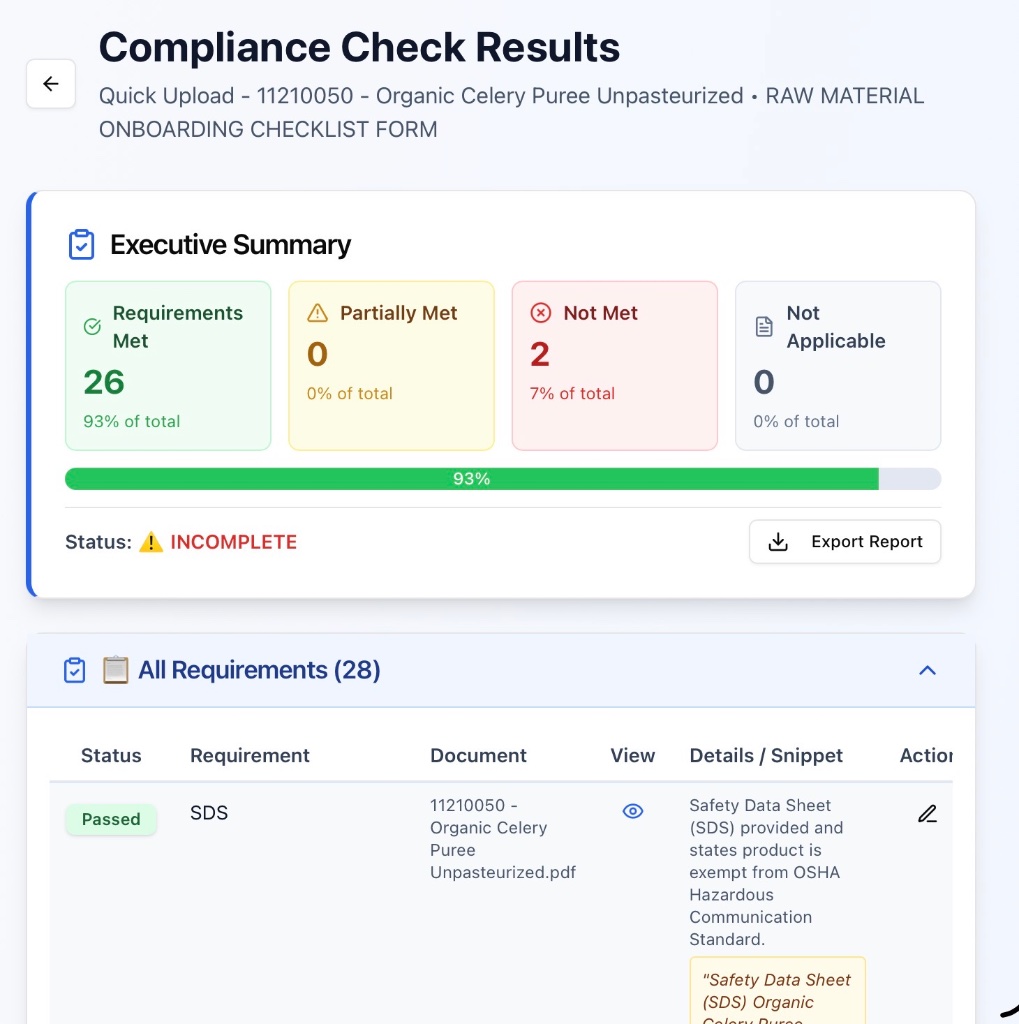
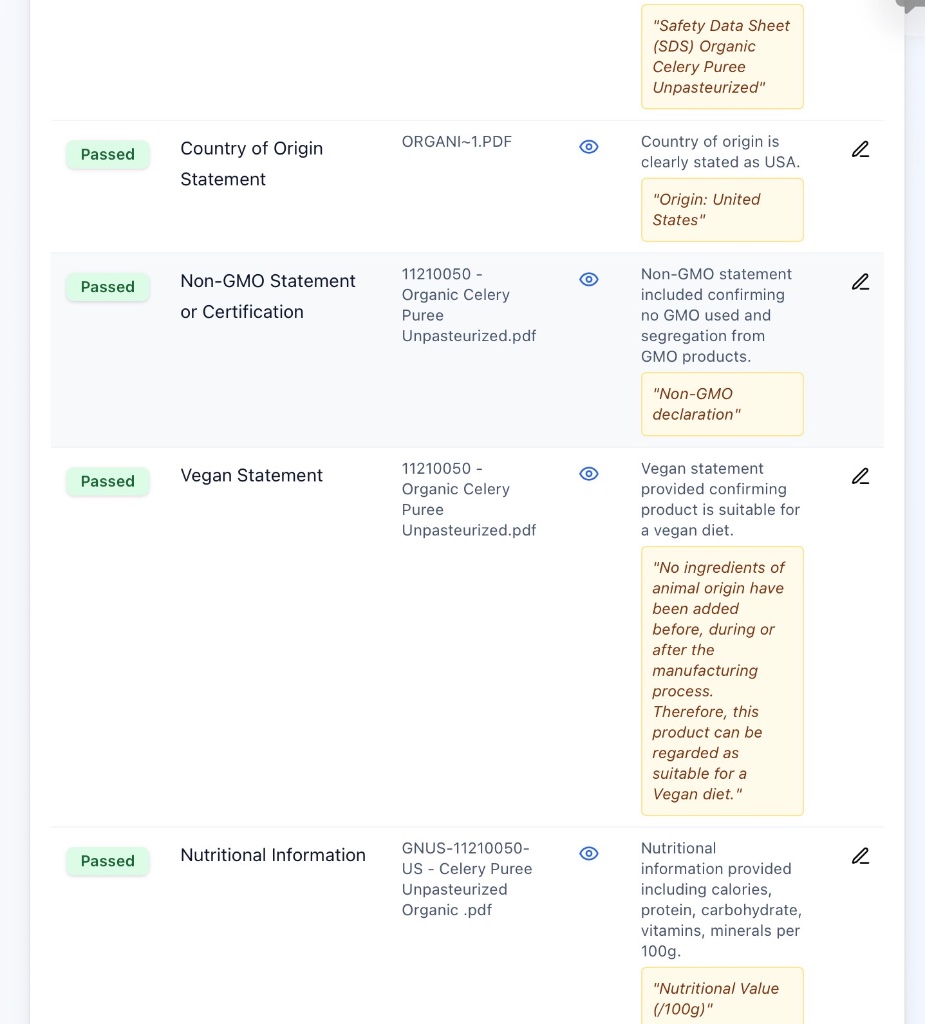
DocSearchCheck reviews the documents in your folder against your requirements and shows you what it found, what may be missing, and where the supporting evidence came from.
How it works
Add your requirements
Upload or create the checklist your team already uses.
Upload the documents
Add the PDFs or document set you need to review.
Review the findings
See what passed, what needs attention, and the supporting evidence. Your Quality team still makes the final decision.
Who it’s for
For teams that review document sets they already have. DocSearchCheck works alongside your existing ERP or QMS — it doesn’t replace them, and your team keeps the final decision.
Teams
Common uses
- •Supplier qualification
- •Audit readiness
- •Document completeness review
- •Certificate and specification review
- •Checking files against internal requirements
You don't need another Quality system.
Your ERP, eQMS, supplier portal, SharePoint, Salesforce, or shared drive may already manage supplier records, approvals, and document storage.
But someone in Quality still has to review what's actually inside the documents.
That's where DocSearchCheck fits.
Upload the supplier folder
Use the files you already receive.
Use your existing checklist
No need to redesign your approval process.
See what needs attention
DocSearchCheck surfaces what it found, what may be missing or outdated, and the supporting evidence.
Quality reviews. Quality decides.
DocSearchCheck helps your team get to the decision faster.
Works alongside the systems you already use — or as a simple standalone solution for teams that don't have one.
Why DocSearchCheck works alongside your compliance tools
Keep your current compliance system as the system of record. Use DocSearchCheck to help Quality get through document reviews — supplier packets, raw material files, audit prep, and more — faster and more consistently.
| Existing Quality / Supplier Systems | DocSearchCheck | |
|---|---|---|
| Primary role | Manage records, workflows, approvals, and documents | Review document content against your requirements |
| Document review | Often completed by the Quality team | First-pass searching and checking assisted by DocSearchCheck |
| Evidence | Depends on the existing system and workflow | Points reviewers to supporting document evidence |
| Implementation | Already part of your existing process | Designed to work alongside your existing process |
| Final decision | Quality | Quality |
Not a replacement for your compliance system — a faster way for Quality to get through document reviews and move decisions forward.
Trusted by people who live the Quality work
Built from real conversations with Quality, Regulatory, Supplier Quality and Operations professionals.
“Finding and confirming the right evidence and making sure everything is complete and current can take more time than the actual technical review.”
“The biggest time drain is often production follow-up and corrective actions, especially when Quality ends up chasing the same issues repeatedly.”
“DocSearchCheck is definitely a game changer.”
Featured at the 2026 Poultry Sustainability & Welfare Summit
Catch gaps in your documents before they become problems
Your existing system may manage the process — supplier records, workflows, approvals, storage, reminders, and renewals. DocSearchCheck helps Quality get through the documents: checking files against your requirements, highlighting missing or unclear information, and surfacing citation-backed evidence — with certificate expiration tracking included as one of its capabilities.
Document Review Capabilities
Everything needed for efficient requirement verification — from supplier qualification to audit readiness
Industries Using DocSearchCheck
For your privacy, we don't name individual customers — but here's where DocSearchCheck is being used today.
Why Quality and Compliance teams choose DocSearchCheck
Manual document review creates delays, missed gaps, and inconsistent decisions. DocSearchCheck helps standardize the process and speed it up.
What Happens Without a Better Process
Quality Assurance
- • Hours spent reviewing 20–40 document folders
- • Manual checklist comparisons
- • Backlogs that never fully disappear
- • Document content still needs manual review, even with an ERP or eQMS in place
Procurement / Sourcing
- • Waiting on compliance answers to move suppliers forward
- • Delays in onboarding new vendors
- • "I'll get back to you" moments in meetings
What Changes With DocSearchCheck
Quality reviews move faster
- • Reduce the time spent on first-pass document review
- • Requirement verification standardized
- • Instant compliance answers with evidence
- • Bridges the document-content gap most ERPs, eQMS systems, and supplier portals don't cover
Supplier onboarding accelerates
- • Help Quality get to supplier approval decisions faster
- • Clear gap identification for supplier feedback
- • Fewer approval delays
Continuous Improvement sees measurable gains
- • Time savings across departments
- • Reduced internal friction
Finance sees more from the team it already has
- • Time savings without adding headcount
- • Existing team becomes more productive
- • Predictable flat-fee cost
It's not your team.
It's the process.
And the process can be improved.
The Bottom Line
Manual document review can consume significant Quality time and create pressure to add headcount. DocSearchCheck helps existing Quality, Regulatory, and Compliance teams review more documentation, catch more gaps, and work more efficiently without expanding manual review work.
By reducing repetitive document checking and speeding up requirement verification, teams can improve throughput without adding the same level of labor cost.
Get more capacity from the Quality team you already have.
DocSearchCheck reduces repetitive searching and first-pass document checking so experienced Quality professionals can spend more time reviewing risk, resolving gaps, and making decisions.
Save time before adding complexity or headcount.
Quality expertise stays with Quality. DocSearchCheck helps reduce the repetitive work surrounding the decision.
Document Review Across Food, Beverage, and Supplement Manufacturing
DocSearchCheck helps Quality, Regulatory, Procurement/Sourcing, and Compliance teams across dairy, poultry, beverage, dry baking, baby & toddler food, and nutraceutical/supplement manufacturing review supplier documents against any checklist of requirements. If you have a list of items that need to be met within a set of documents, DocSearchCheck can help you review them — including audit readiness checks, raw material document review, supplier onboarding review, packaging document review, and COA/COI review. Learn more about how the review process works or explore pricing.
Security & privacy
Private to your workspace
Your documents remain private to your user or team workspace.
Team access is controlled
Only members you invite to your team can see your team's folders and results.
Not used to train AI models
Documents are processed only to complete your review — never used to train AI models.
Privacy and Security Questions
Common questions about your document security and how DocSearchCheck handles your files
Do you connect to our systems or see everything we have?
No — DocSearchCheck is designed to be non-invasive. We never connect to your ERP, eQMS, shared drives, or other systems. We only see the specific documents you choose to upload for a review.
Are my documents used to train AI models?
No. Your uploaded documents are processed only to complete your review and are not used to train public AI models.
Are my documents stored with AI providers?
No. Documents are sent securely for processing during your review but are not retained or stored by our AI providers. Your files remain tied to your DocSearchCheck workspace.
Can other companies see my documents?
No. Supplier documents remain private to your workspace and are not shared with other customers.
Do you share who your customers are?
No. We keep our customer list confidential — the same privacy standard we apply to your documents.
What does the AI actually do with my files?
DocSearchCheck reviews your uploaded supplier documents against your requirements, highlights missing or non-compliant items, and provides citations back to the original files.
How secure is this, really?
No AI-connected system can guarantee perfect security, and we won't tell you otherwise. What we do is minimize exposure at every step: private, access-controlled storage, no public file links, authenticated connections between system components, and no access to your other business systems.
Ready to spend less time searching through documents?
Free to try. No credit card required.